

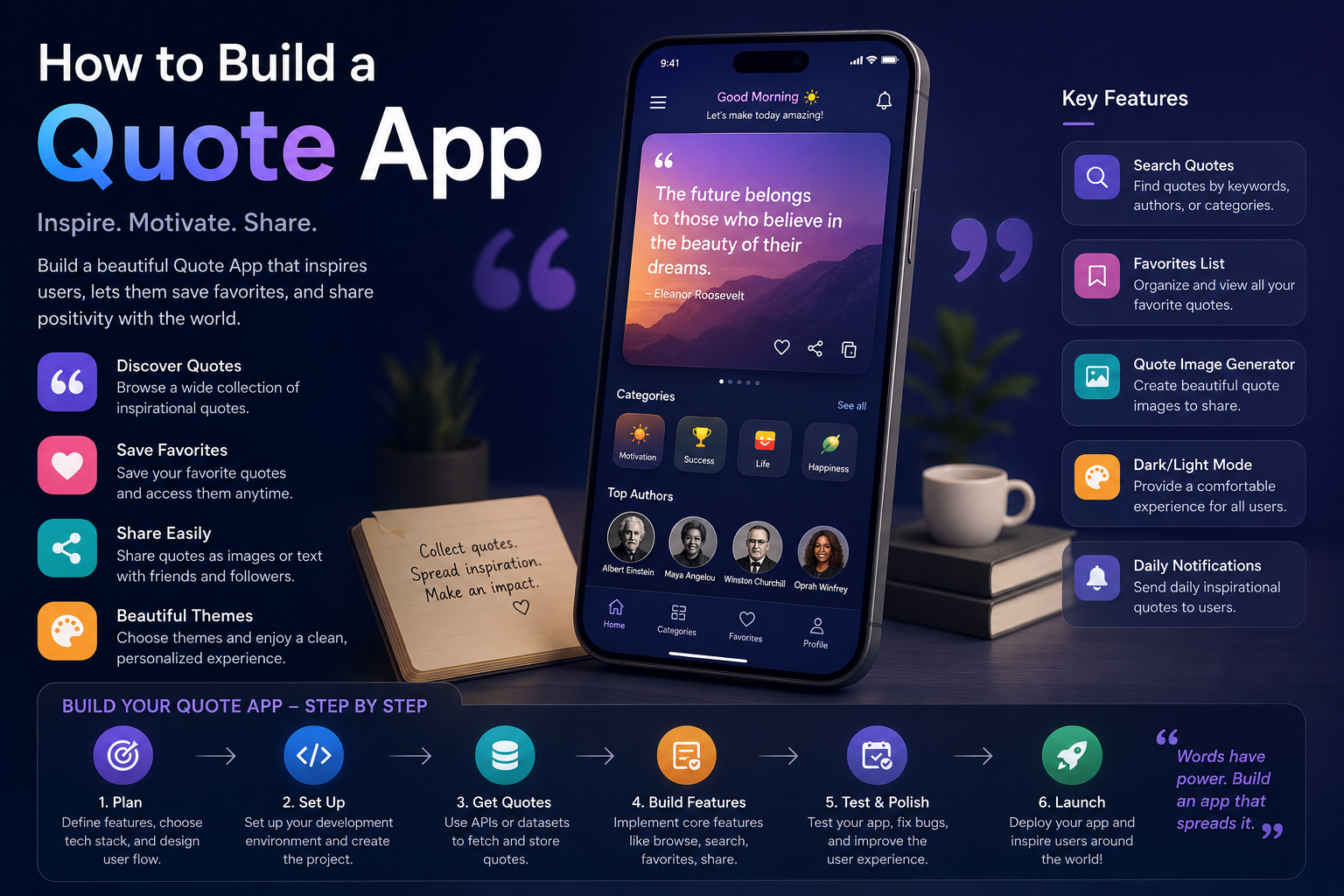
A Quote App is a perfect beginner-to-intermediate project. Below is a complete guide covering different complexity levels, tech stacks, and features.
Related Posts
1. Define Your App Type
| Type | Description | Best For |
|---|---|---|
| Random Quote Generator | Displays a random quote on click/load | Beginners |
| Quote of the Day | Changes once every 24 hours | Daily inspiration sites |
| Searchable Quote Library | Users search by author, category, or keyword | Intermediate |
| Quote Collector | Users save favorite quotes (needs database) | Advanced |
| Quote API Builder | Build your own quote API for other apps | Backend focus |
2. Quick MVP Features (Minimum Viable Product)
- Display a quote and its author
- Button to fetch a new random quote
- (Optional) Share quote on Twitter/X
- (Optional) Copy to clipboard
3. Tech Stack Options
| Approach | Tech Stack | Difficulty | Best For |
|---|---|---|---|
| Static (no backend) | HTML, CSS, JavaScript + quotes array | Beginner | Learning JS |
| React Frontend | React + Vite, Tailwind CSS, Fetch API | Intermediate | Modern SPA |
| Full Stack | Node.js/Express + MongoDB + React | Advanced | Portfolio project |
| No-Code | Glide, Bubble, or Airtable | Beginner | Non-developers |
| Mobile | Flutter or React Native | Advanced | iOS/Android |
4. Step-by-Step Implementation
Option A: JavaScript (No Framework) – Simplest
Step 1: HTML Structure
html
<!DOCTYPE html>
<html>
<head>
    <title>InspireQuote</title>
    <link rel="stylesheet" href="style.css">
</head>
<body>
    <div class="container">
        <div class="quote-box">
            <p id="quote">"Your quote will appear here"</p>
            <p id="author">— Author</p>
            <button onclick="newQuote()">New Quote</button>
            <button onclick="copyQuote()">Copy</button>
        </div>
    </div>
    <script src="script.js"></script>
</body>
</html>
Step 2: JavaScript with Local Quotes Array
javascript
// script.js
const quotes = [
    { text: "The only limit is your mind.", author: "Anonymous" },
    { text: "Do what you can, with what you have, where you are.", author: "Theodore Roosevelt" },
    { text: "Success is not final, failure is not fatal.", author: "Winston Churchill" },
    { text: "Believe you can and you're halfway there.", author: "Theodore Roosevelt" }
];

function newQuote() {
    const randomIndex = Math.floor(Math.random() * quotes.length);
    const quote = quotes[randomIndex];
    document.getElementById("quote").innerHTML = `"${quote.text}"`;
    document.getElementById("author").innerHTML = `— ${quote.author}`;
}

function copyQuote() {
    const quoteText = document.getElementById("quote").innerText;
    const authorText = document.getElementById("author").innerText;
    navigator.clipboard.writeText(`${quoteText} ${authorText}`);
    alert("Quote copied!");
}

// Load a quote on page load
newQuote();
Step 3: Basic CSS (style.css)
css
body {
    font-family: Arial, sans-serif;
    background: linear-gradient(135deg, #667eea 0%, #764ba2 100%);
    display: flex;
    justify-content: center;
    align-items: center;
    height: 100vh;
    margin: 0;
}

.quote-box {
    background: white;
    padding: 40px;
    border-radius: 20px;
    max-width: 600px;
    text-align: center;
    box-shadow: 0 10px 40px rgba(0,0,0,0.2);
}

button {
    background: #667eea;
    color: white;
    border: none;
    padding: 10px 20px;
    margin: 10px;
    border-radius: 25px;
    cursor: pointer;
    font-size: 16px;
}

button:hover {
    background: #764ba2;
}
Option B: React + API (Modern Approach)
Step 1: Create React App
bash
npm create vite@latest quote-app -- --template react
cd quote-app
npm install axios
npm run dev
Step 2: Quote Component
jsx
// src/QuoteApp.jsx
import { useState, useEffect } from 'react';
import axios from 'axios';

function QuoteApp() {
    const [quote, setQuote] = useState({ text: "", author: "" });
    const [loading, setLoading] = useState(false);

    const fetchQuote = async () => {
        setLoading(true);
        try {
            // Free quote API
            const response = await axios.get('https://api.quotable.io/random');
            setQuote({
                text: response.data.content,
                author: response.data.author
            });
        } catch (error) {
            console.error("Error fetching quote:", error);
        } finally {
            setLoading(false);
        }
    };

    useEffect(() => {
        fetchQuote();
    }, []);

    const shareOnTwitter = () => {
        const tweetText = `"${quote.text}" — ${quote.author}`;
        const twitterUrl = `https://twitter.com/intent/tweet?text=${encodeURIComponent(tweetText)}`;
        window.open(twitterUrl, '_blank');
    };

    return (
        <div className="quote-container">
            {loading ? (
                <p>Loading inspiration...</p>
            ) : (
                <>
                    <blockquote>"{quote.text}"</blockquote>
                    <cite>— {quote.author}</cite>
                    <div className="buttons">
                        <button onClick={fetchQuote}>New Quote</button>
                        <button onClick={shareOnTwitter}>Share on X</button>
                    </div>
                </>
            )}
        </div>
    );
}

export default QuoteApp;
Option C: Full Stack with Database (Advanced)
Backend (Node.js + Express + MongoDB):
javascript
// server.js
const express = require('express');
const mongoose = require('mongoose');
const cors = require('cors');

const app = express();
app.use(cors());
app.use(express.json());

// Quote Schema
const quoteSchema = new mongoose.Schema({
    text: String,
    author: String,
    category: String,
    createdAt: { type: Date, default: Date.now }
});

const Quote = mongoose.model('Quote', quoteSchema);

// Routes
app.get('/api/quotes/random', async (req, res) => {
    const count = await Quote.countDocuments();
    const random = Math.floor(Math.random() * count);
    const quote = await Quote.findOne().skip(random);
    res.json(quote);
});

app.get('/api/quotes/author/:name', async (req, res) => {
    const quotes = await Quote.find({ author: req.params.name });
    res.json(quotes);
});

app.post('/api/quotes', async (req, res) => {
    const newQuote = new Quote(req.body);
    await newQuote.save();
    res.status(201).json(newQuote);
});

mongoose.connect('mongodb://localhost:27017/quoteDB')
    .then(() => app.listen(5000, () => console.log('Server running')));
5. Free Quote APIs (No Backend Needed)
| API | Endpoint | Rate Limit |
|---|---|---|
| Quotable | https://api.quotable.io/random | Unlimited |
| ZenQuotes | https://zenquotes.io/api/random | 50/hour |
| Programming Quotes | https://programming-quotes-api.herokuapp.com/Quotes/random | Unlimited |
| Ninja Quotes | https://api.api-ninjas.com/v1/quotes | 50/day (free key) |
6. Advanced Features to Add
- Category filter – Motivation, love, life, success, etc.
- Favorite quotes – Save to localStorage or user account
- Daily notification – Push notification or email with QOTD
- Wallpaper generator – Quote over beautiful background images
- Voice read-aloud – SpeechSynthesis API
- Dark mode – CSS toggle
- Quote submission – Let users add their own quotes
- Export as image – Canvas API to save quote as PNG
7. Sample Project Structure (React App)
text
quote-app/
├── public/
├── src/
│   ├── components/
│   │   ├── QuoteCard.jsx
│   │   ├── QuoteButtons.jsx
│   │   └── CategoryFilter.jsx
│   ├── hooks/
│   │   └── useQuote.js
│   ├── services/
│   │   └── quoteAPI.js
│   ├── styles/
│   │   └── quote.css
│   ├── App.jsx
│   └── main.jsx
├── package.json
└── README.md
8. Deployment Options
| Platform | Free Tier | Best For |
|---|---|---|
| Netlify | Yes | Static + React apps |
| Vercel | Yes | Next.js/React |
| GitHub Pages | Yes | Simple HTML/CSS/JS |
| Render | Yes | Full Stack (Node + DB) |
9. Live Demo Ideas (30-Minute Builds)
Ultra-simple (5 lines of code):
javascript
setInterval(() => {
    fetch('https://api.quotable.io/random')
        .then(res => res.json())
        .then(data => console.log(`"${data.content}" — ${data.author}`));
}, 5000);
Chrome Extension:
Build a “New Tab Quote” extension that shows a quote every time you open a tab.
Terminal Quote:
bash
curl -s https://api.quotable.io/random | jq '.content + " — " + .author'
10. Learning Resources
- Quotable API docs – https://github.com/lukePeavey/quotable
- React quote tutorial – FreeCodeCamp YouTube
- LocalStorage for favorites – MDN Web Docs
- Canvas quote poster – CSS-Tricks guide
